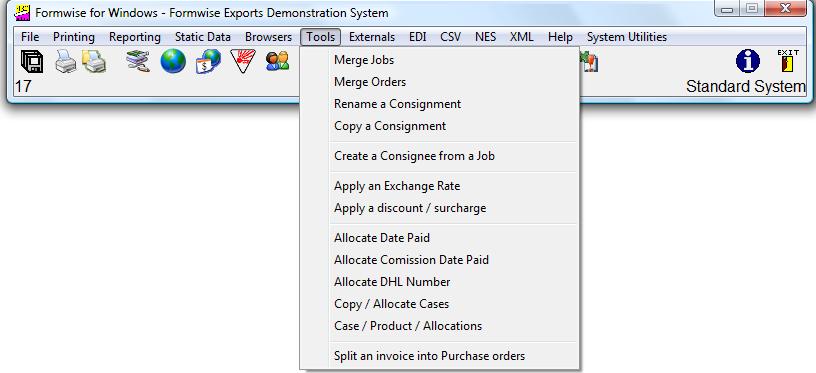
As you can see from the above graphic, there are number of options for special processing of consignments, depending on the actual system installed, as follows :-
1. Toolbar – Tools -
Merge Jobs:
This option allows the merging of records from a multiple of consignments into another job. This will therefore allow the creation of one set of shipping documents covering a number of invoices, or the creation of one invoice from a number of consignments which may for example have been created by the sales order processing system and transferred to Formwise. This should allow the avoidance of minimum charges for freight etc.
2. Toolbar – Tools Options –
Merge Orders:
This option is similar in nature to the merging of jobs, except that it keeps track of items taken from an order, including how many remain to be shipped. This facility is aimed at those customers who use their Formwise system as their sales order processing system.
3. Toolbar – Tools –
Rename a Consignment:
As a general rule, the Formwise system will allow you to create consignments against a key which is typed in by the user. Unfortunately we are not always as accurate in typing as we would like to be, and this option allows the user to re-name a consignment.
4. Toolbar – Tools –
Copy a Consignment:
More often used by those companies not having a linked sales order processing system, this option allows the creation of a new consignment based on an existing consignment. This allows the complete copying of a consignment to a new reference. IT IS INCUMBENT ON THE OPERATOR TO ENSURE THAT THE DETAIL IS MODIFIED AS
NECESSARY !!.
If you wish us to configure the system such that certain fields are not
copied, then please contact us on the Support Line.
5 Toolbar - Tools - Create a Consignee from a Job: This option allows the creation of a Consignee record in the static database from an actual job. This therefore allows you to complete a job for a new consignee and then create the static record from that job. This should prove useful to a user who is reading data transferred from an ERP system for a new delivery address / customer which has not yet been set up in the static file for Consignees.
5 Toolbar - Tools - Create a Consignee from a Job: This option allows the creation of a Consignee record in the static database from an actual job. This therefore allows you to complete a job for a new consignee and then create the static record from that job. This should prove useful to a user who is reading data transferred from an ERP system for a new delivery address / customer which has not yet been set up in the static file for Consignees.
6. Toolbar - Tools -
Apply an Exchange Rate:
This option allows the conversion of a consignment from one currency to another and has been re-written so that the option cannot be run more than once accidentally.
7, Toolbar - Tools -
Apply a Discount or Surcharge:
This option allows the complete re-pricing of a consignment by a given percentage.
8. Toolbar – Tools -
Allocate a Date Paid:
This option allows the recording of the date of payment across a number of consignments. This field being used by the Commission sub-system.
9. Toolbar – Tools –
Allocate Commission Paid Date:
Having run through the sub-system for commission management, this option allows the recording of the commission paid date to a number of consignments.
10. Toolbar – Tools -
Allocate a DHL Number:
This option allows the allocation of the next number from a series of allowable numbers given to you by DHL when using the system to print laser versions of the DHL Airwaybill.
11. Toolbar – Tools –
Copy/Allocate Cases:
This option allows the creation of a number of case records including allocating products where the consignment contains a number of packages which are the same size etc., by virtue of having the same contents. If the consignment already has cases an products
allocated then the allocation of products to cases will have to be done manually.
12. Toolbar - Tools - Case / Product / Allocations:
13. Toolbar - Tools - Split an Invoice into Purchase Orders: This option allows you to create a job with all line items, log a supplier against each line item, check the "Bought in" flag and then create a Purchase order job for each supplier within the consignment. They will be given the suffix 001, 002 etc to the original consignment reference.
12. Toolbar - Tools - Case / Product / Allocations:
13. Toolbar - Tools - Split an Invoice into Purchase Orders: This option allows you to create a job with all line items, log a supplier against each line item, check the "Bought in" flag and then create a Purchase order job for each supplier within the consignment. They will be given the suffix 001, 002 etc to the original consignment reference.