Whilst the
EASI system produces a sales listing report, the
Elite and Export ranges, would have this as probably the most powerful reason to use the system.
In creating documentation for a consignment, you have captured all the
data which it is then possible to use as a resource for any required
activity and statistical reports.
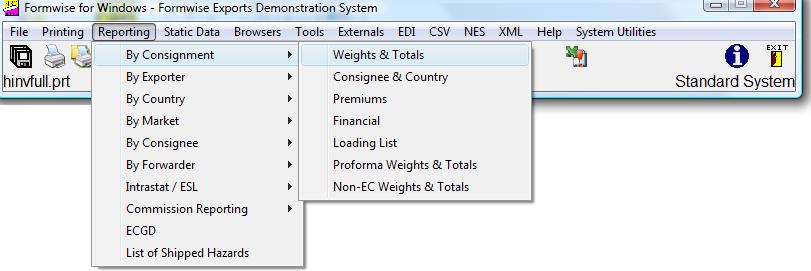
You can see that from the Reporting option on the toolbar, you can have access to the
choice of reports as in the screen capture below :-
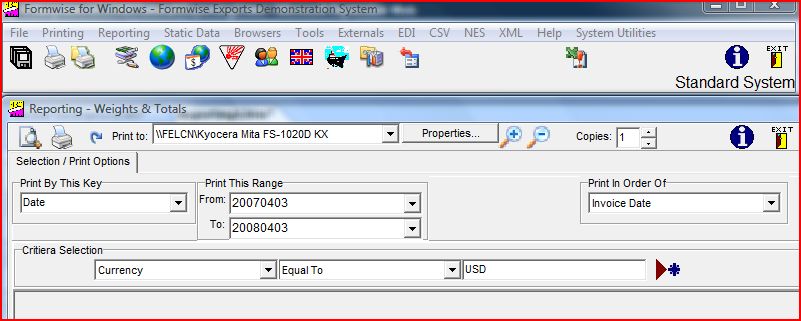
Having selected your report from the above, you will then be faced with a number of options both about the range of consignments to be included, and then by skilful use of the criteria screen, refining the report such that it contains only those consignments in which you are interested. Because we have selected to "Print By Key" of (Invoice)Date, we will print a report with all consignments whose invoice date falls between the selections available in drop down lists, and would have selected the first consignment in the list for the "From" and the last consignment in the drop down list for the "To", and chosen to print them to a specific printer. It may be best to ask for a preview to screen to ensure you have selected the data correctly, especially as you can still ask the system to print a hard copy having previewed the result.
If we wish to restrict the data to include only consignments which meet certain criteria, then we would need to add "Criteria Selection" as below:-
You can see from the above that we clicked on the drop down list and selected Currency, then selected the parameter "Equal to" on the next drop down, and finally typed in "USD". If the item were a key then it would be possible for the data to be displayed in the drop down. Clicking on the "New" icon (Set Criteria) allows further criteria to be added to the list.
Please note that if you wanted to select a few consignments for inclusion on this report format, rather than choose to print by range, you can click on the
 Print Toggle icon, select the consignment(s) for inclusion and move them into the column as in the graphic below:-
Print Toggle icon, select the consignment(s) for inclusion and move them into the column as in the graphic below:-
In terms of the order in which consignments are printed, this is affected by the choice of "Print in Order of:", such that we could ask for a list of all consignments, but only where a certain forwarder key was stored. In this situation the system would look at each consignment in key order, checking whether the criteria was met, and thus all records would be read. If however we chose to print by forwarder key, then as the file is already indexed then only the appropriate records would need to be read, thus giving a
potentially time saving, dependent on the speed of your server.
In view of the multiplicity of reports, and the selection criteria, we think this is a most powerful reporting tool, either for standard reports, or one-off enquiries. If you do wish to have a certain report set up for you, or you are unsure how to run the report, then please contact us on the Systems
Support
line.
The last report format on this option is a loading list and can be used to list different consignments eg if they are to be shipped together. Please click on the text
Loading List
to go through the options.
If you notice an error in the data when previewing a report to screen, then if you were to double-click on the consignment reference, the system will come up with the graphic :-
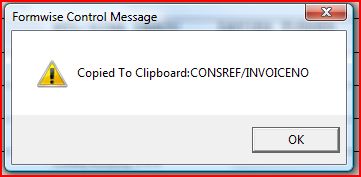
and you can then click on the OK button of this Formwise Control Message, move to Browse/Amend/Create Consignments and press "Ctrl and V" to paste the reference into the code field and have the system move to that job. You can then Open, Edit and Save the job This option works with any field, even in Browse mode on the Browse/Amend/Create consignment screens. The only variation being that if you double click on an e-mail address, then the system will automatically load your Outlook mail with a New message and recipient completed.
That covers printing of reports, but similar facilities exist to browse for information
either by clicking on the icon, or by going to
 the Tools / Browsers / Consignments / Weights and Total option. This would facilitate a
search on those criteria.
the Tools / Browsers / Consignments / Weights and Total option. This would facilitate a
search on those criteria.
the Tools / Browsers / Consignments / Weights and Total option. This would facilitate a
search on those criteria.
Whilst detailed reports are essential, users have asked for more immediate research tools, e.g. what jobs have we shipped to a customer, and what products did he/she order, what jobs have we shipped to a country or via a specific forwarder. Please click on
Processing a Consignment � Browser Options for more information.
There is also the option, where regular reporting is required, to create files which output CSV (Comma Separated Variable) files, which can be read by Microsoft Excel or Access and if you have specific requirements then please speak to us on the Support Line.
There is also the option, where regular reporting is required, to create files which output CSV (Comma Separated Variable) files, which can be read by Microsoft Excel or Access and if you have specific requirements then please speak to us on the Support Line.
281016