One point which must be born in mind is that the data to be reported MUST NOT CONTAIN THE CHARACTERS - : + [ ] or the submission will be rejected
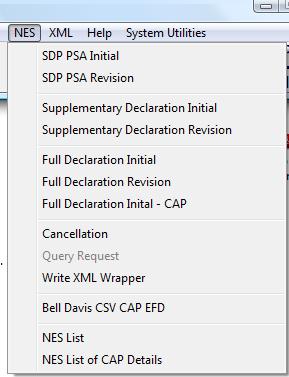
So we can submit the declaration by one of the following routes:-
1. E-mail attachment:
Because of its ease of use, this has proved to be a popular option as it involves creating an extract file from Formwise and attaching that file to an e-mail. There are a range of message types but most users are submitting the Full Initial. Please note that if you are a food exporter and you intend to use the procedure for the submission of RPA claims, then this method is deemed not to be secure enough, and you will be forced to use either the web-service or Service Provider options below.
2. A Service Provider, eg Bell Davis or Community Network Services
These companies offer a service of either :-
a the facility to key data into their system, as in option 1 above, and submit the data to HM Customs on your behalf, or
b receive data in a standard format extract from Formwise. However there is a not insubstantial cost involved in either of these methods.
The first thing that must be done is to complete an application form. If you do not wish to use Simplified Clearance Procedure then you should complete a Form PA7, which is a single page document and is available from the Download page of our web-site. If you do wish to use the Simplified Clearance Procedure, possibly because you will not have all the data to hand, then you will need to complete the downloadable form CE42 www.hmce.gov.uk/forms/forms/ce42.pdf. You will be asked to select a type of submission and if approved for the email attachment route, you will be given a role and location, which you will need to provide to us on the support line, and your system MUST be upgraded with this data before you can proceed.
For all the options, the creation of the attachment files uses the same methodology as follows:-
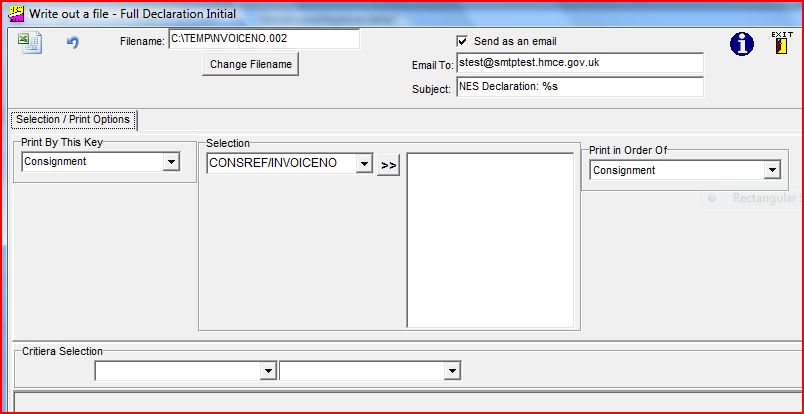
Enter the consignment required, move it into the middle by clicking on the
 button and, if required, select more consignments. We suggest that you change the filename and keep a permanent record of submissions. You can then click on the
 icon and the system will prepare the extract file and close the option for you, but we advise that you check the box "Send as an e-mail", and as you can see from the above graphic that the correct address is already in place
Message Responses:
The person submitting the email will receive the initial response message as follows:
X400
Inter-personal Notification:
Your
message to
was received at 06 Feb 2008 14:36:47 +0000
This notification was generated
Manually
The following extra information was given:
NES Declaration
There are a number of potential return messages all of which are in EDI format and are therefore extremely difficult to read.
RESPONSE MESSAGE:
UNB+UNOA:2+EDRCHIEF+THSAHFN::LOCEDCAHFN+080206:1436+0000941433+000850+CHIEFLI
VE++++0'UNH+08020614364167+CUSRES:D:04A:UN:109730'BGM+EFD::109++29'DTM+7:2008
02061436:203'LOC+14+GBTHP::109'LOC+22+065::109+A'LOC+44+555::109'RFF+ABT:A173
85V:1'RFF+ABO:8GB514918246000-000365W:N'RFF+ABS:A1'RFF+AHZ:1:H'DOC+960'MOA+40
:10800.00'MOA+55:0.00'MOA+9:0.00'MOA+74:0.00'MOA+176:0.00'CST+1'TAX+5'MOA+123
:10800.00'UNT+20+08020614364167'UNZ+1+0000941433'
SAMPLE ERROR MESSAGES
CUSRES
ERC+6::109'FTX+AAO+++E2658
COMMODITY DOES NOT REQUIRE SUPPLEMENTARY
ERC+6::109'FTX+AAO+++E2655
COMMODITY REQUIRES SUPPLEMENTARY UNITS'
ERROR NUMBER AND PROBLEM
CONTRL
+
CUSDEC:D:04A:UN:109730+4'UCS+384'
WITH AN ERROR LIKE THIS EMAIL THE
RESPOMSE FILE AND THE ORIGINAL SUBMISSION FILE TO
MIKE@FORMWISE.CO.UK
CONTRL
CUSRES
:4:1:UN'UCI+DTICHIEFEDI+THSAHAT+CHIEF+4'UCM+000670+CUSDEC:D:04A:UN:109730+4'UCS+0+10'UCD+10+0'UNT+6+08013111114073'UNZ+1+0000935874'
WITH AN ERROR LIKE THIS EMAIL THIS
AND THE ORIGINAL SUBMISSION FILE TO
MIKE@FORMWISE.CO.UK
CUSRES
ERP+:4:1+CST:88:5'ERC+6::109'FTX+AAO+++E1077
BASE COMMODITY DOES NOT EXIST'
CUSRES
ERP+:0+:0:5'ERC+6::109'FTX+AAO+++E1697
A CPC MUST BE ENTERED'
ERP+:0+:0:5'ERC+6::109'FTX+AAO+++E256
CPC REQUIRES COMMODITY CODE TO BE DECLARED'
ERP+:0+:0:5'ERC+6::109'FTX+AAO+++E2483
AT LEAST ONE ITEM PACKAGE MUST BE SUPPLIED'
ERP+:4:1+CST:16:5'ERC+6::109'FTX+AAO+++E1077
BASE COMMODITY DOES NOT EXIST'
ERP+:0+LOC:34:5'ERC+6::109'FTX+AAO+++E10436
FIELD GDS-DESC IS MANDATORY'
ERP+:0+:0:5'ERC+6::109'FTX+AAO+++E2482
AT LEAST ONE PREVIOUS DOCUMENT MUST BE SUPPLIED'
ERP+:0+:0:5'ERC+6::109'FTX+AAO+++E2482
AT LEAST ONE PREVIOUS DOCUMENT MUST BE SUPPLIED'
Following receipt, the
INDIVIDUAL SUBMITTING ADDRESS AND MAIN REPORT ADDRESS
RECEIVE THE FOLLOWING FOR ALL SUBMISSIONS AS AN ATT*.DAT FILE. The file
can be opened with Word and shows in the file, but
subject to a ragged display, the following:-
*GBP*
*GBP*
CHIEF EXPORT PRE-LODGEMENT ADVICE at
14:36 DTI-P2 on
06/02/2008 Entry:
555-A17385V-01/01/2008
EPU ENTRYNO
DATE
TIME
DATE
NUMBER
FDE
version 01 for
ABCDEFGH
COMPANY ROLL
Route H
at 065 status A1
page 0000000001
ENTRY ACCEPTANCE DETAILS
ENTRY DATA HELD PENDING GOODS ARRIVAL
Declarant Id
GBVATNUMBER
Submitting TURN
CONSIGNMENT DETAILS
Decln UCR
8GBvatnumber-000000W
part N
Consignor
GBVATNUMBER NAME OF
CONSIGNOR
Location
GBTHP
Total packages 10
Total Stat value
10000.00
The entry of data is covered during the Processing a Consignment pages of this help file.
(NB HM Revenue & Customs also suggest that you keep a print of the C88 (SAD) copy 3). This does require that you enter the Customs Entry Number from the approval message. This can be extracted using the appropriate routine from the EDI Read options). Please note that with the web entry a document called a
"Copy 3 Equivalent" is produced. Some forwarders seem to think that this is the real document but as its name suggests this is because the web system cannot print a real Copy 3 C88. If you have trouble with the forwarder, usually with shipments from non-UK European ports, please forward the contact details and documents to us and we will put SITPRO on their case.
EXPORTS FROM EU VIA ANOTHER EU COUNTRY:
Some customers have problems with shipments which are being exported
through the European Union, either port or across a land border and
whilst we would like to put SITPRO on their case and prove that the real
C88 Copy 3 is an ACTUAL document, we recognise the practicality of
giving the forwarder or customs authorities what they are expecting and
for this reason we have added a print option to print the Equivalent
Copy. This should prove acceptable, providing you have entered the EPU,
Entry Number and Date from the clearance message.
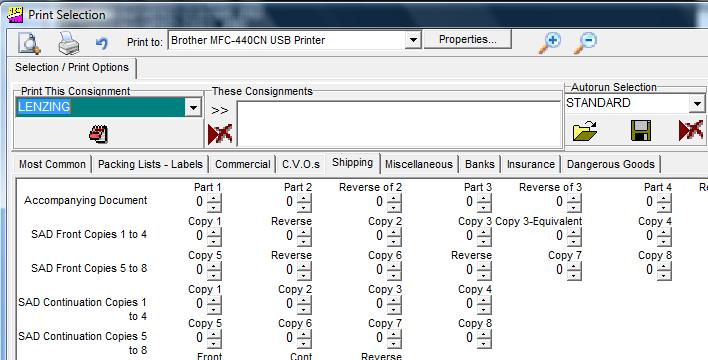
insert new print menu with sad 3 equivalent
The final option on the menu above gives access to a reporting tool for listings of UCR's and, if used, the stack numbers allocated from within the Formwise system.
NB This suite of programs is not included in the EASI range of systems.