For users of the Elite and Export range of systems wishing to prepare and submit declarations to HM Customs for NES, then you first need to ensure that you have a Unique Consignment Reference for the consignment. This is constructed from a number of elements as follows:-
1. the final digit of the calendar year
2, your VAT number
3. your TURN (Trader's Unique Reference Number) number
4. a unique reference number, possibly the invoice number.
However to avoid any possibility of duplication, we have reserved a button
 on the Browse/Amend/Create Consignments panel to allocate a UCR for the consignment. This is done by taking the first three elements above and adding to that a number from a stack held by the system. This will ensure that we truly have a unique number.
on the Browse/Amend/Create Consignments panel to allocate a UCR for the consignment. This is done by taking the first three elements above and adding to that a number from a stack held by the system. This will ensure that we truly have a unique number.
You will have noted that earlier in his tutorial we did warn you to stay away from this tab until you have all the necessary data to complete the screen as below.
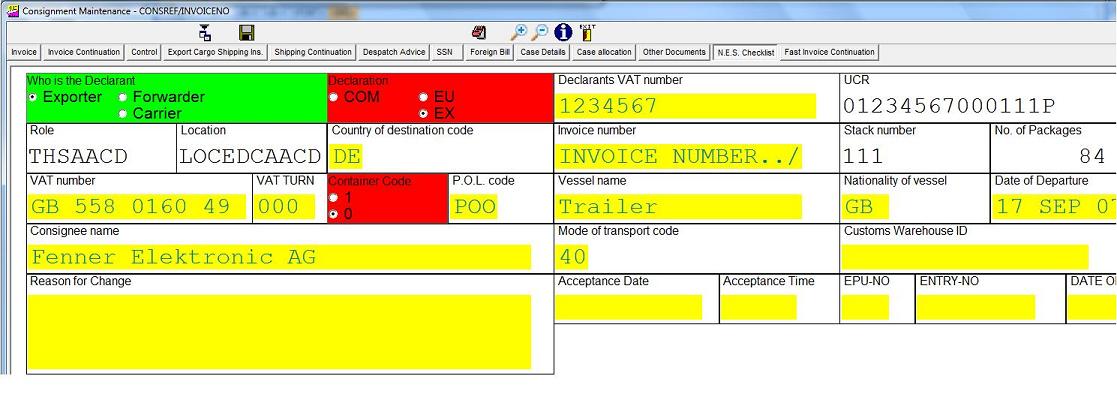 As you can see from the above, the amount of data required is not onerous as it almost
mirrors the elements that were required on a C88 form, but you may need to collect slightly more data, eg Nationality of vessel and Port of Loading Codes. Please note that there is a drop down list available in
Formwise for both these elements. Whilst making all the elements mandatory may seem a little over the top, at the end of the day, the NES submission will be correct.
As you can see from the above, the amount of data required is not onerous as it almost
mirrors the elements that were required on a C88 form, but you may need to collect slightly more data, eg Nationality of vessel and Port of Loading Codes. Please note that there is a drop down list available in
Formwise for both these elements. Whilst making all the elements mandatory may seem a little over the top, at the end of the day, the NES submission will be correct.
This is for the header data, and from the graphic below, you will see the data requirements for each tariff record.
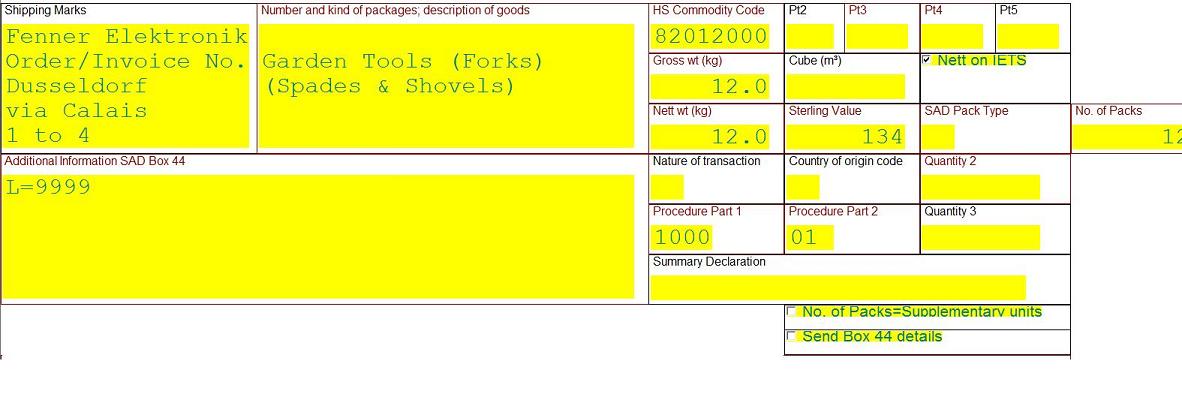
The data against each tariff record can be viewed by selecting the correct page and edited by clicking on the "A" button as normal. (Or by clicking on the Shipping Ins Tab)
This completes the standard and widely used options for the processing of a consignment, and we can now go on to look at Printing Documents