This
 icon has the functionality to assist in making Customs declarations more accurate for those users who do not have
either the expertise or the knowledge to enter weights against the individual products within a consignment. This function
was added to the
program because HM Revenue & Customs had noticed that in some Intrastat declarations, the first tariff record contained all the weight, irrespective of the value
for each commodity code declaration.
icon has the functionality to assist in making Customs declarations more accurate for those users who do not have
either the expertise or the knowledge to enter weights against the individual products within a consignment. This function
was added to the
program because HM Revenue & Customs had noticed that in some Intrastat declarations, the first tariff record contained all the weight, irrespective of the value
for each commodity code declaration.
icon has the functionality to assist in making Customs declarations more accurate for those users who do not have
either the expertise or the knowledge to enter weights against the individual products within a consignment. This function
was added to the
program because HM Revenue & Customs had noticed that in some Intrastat declarations, the first tariff record contained all the weight, irrespective of the value
for each commodity code declaration.
The icon assumes that you have
either entered against the first record the total weight and cube, OR the
individual pack sizes and weights through the case entry screen, and have saved the consignment, and have already run the Auto-allocation routine via the
 icon
to summarise cash values against a commodity code number. If you wish to
check this has been done, you can go to the Control tab and check there
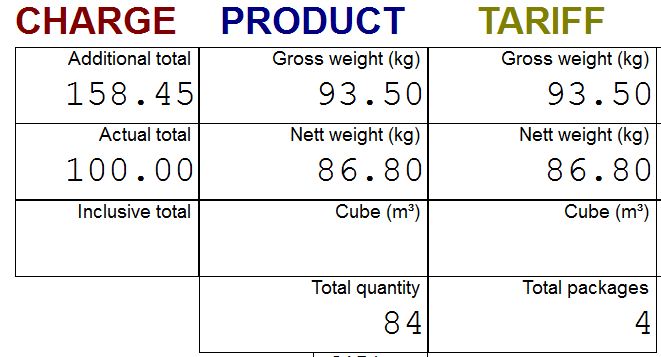
is data under the Tariff column as in the graphic below.
icon
to summarise cash values against a commodity code number. If you wish to
check this has been done, you can go to the Control tab and check there
is data under the Tariff column as in the graphic below.
icon
to summarise cash values against a commodity code number. If you wish to
check this has been done, you can go to the Control tab and check there
is data under the Tariff column as in the graphic below.
On clicking on the
icon, the system will then allocate weights and cubes in proportion to the value of the of the tariff records created by the auto-allocation
routine.
This can be seen in the graphic below:-
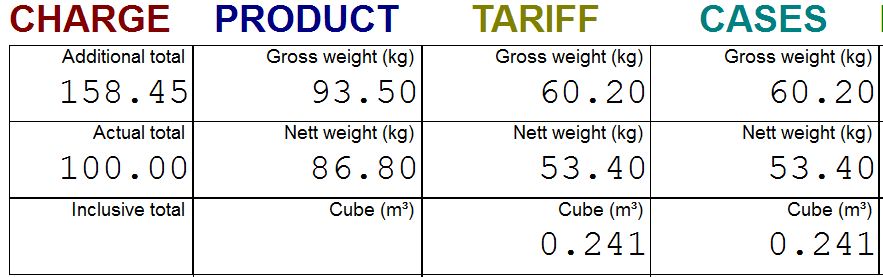
If the weights in the tariff column match those in the product, then there is no need to "Spread Cases", but if the cases match the tariff then the Spread Cases option has been run.
Obviously this can never be totally accurate, for example consider a shipment containing both diamonds and coal, but it is more accurate than placing all the weight against a single commodity code. It should go without saying that this routines should not be used if any of the products fall within the category of hazardous goods.
If for any reason you change either quantities or prices, you MUST re-run the auto-allocation routine followed by this process.
icon, the system will then allocate weights and cubes in proportion to the value of the of the tariff records created by the auto-allocation
routine.
This can be seen in the graphic below:-If the weights in the tariff column match those in the product, then there is no need to "Spread Cases", but if the cases match the tariff then the Spread Cases option has been run.
Obviously this can never be totally accurate, for example consider a shipment containing both diamonds and coal, but it is more accurate than placing all the weight against a single commodity code. It should go without saying that this routines should not be used if any of the products fall within the category of hazardous goods.
If for any reason you change either quantities or prices, you MUST re-run the auto-allocation routine followed by this process.
Next Page Processing - Case Allocation
290915