Essentially this option is the same as the normal print routines but with the options to :-
1. select a range of consignment references, and, if required,
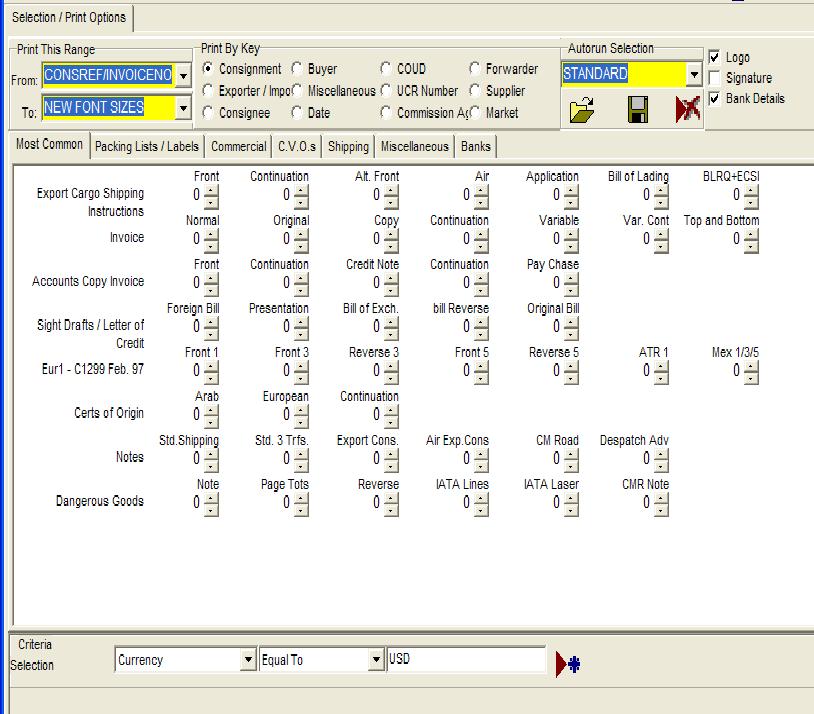
2. Input Selection Criteria:
It is possible to click on the first drop down in the Criteria Selection area of the screen and select Currency, then select the parameter "Equal to" on the next drop down, and finally type in "USD". If the item were a key then it would be possible for the data to be displayed in the drop down. Clicking on the "
 " icon (Set Criteria) allows further criteria to be added to the list.
You can then choose to print by the key required, and insert parameters into the bottom portion of the screen. The addition was made for a customer using Formwise as a print engine for all invoice, both home and export, and he wanted to print home invoices where the date was as specified and the country code equal to "GB". This option allows that functionality.
Obviously there may be a case for printing multiple documents and for this possibility please examine the options for Print using an Autorun.
Next Page Print Using an Autorun
230915