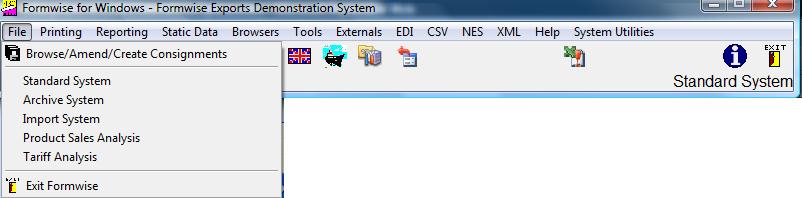
Whilst only the Browse/Amend/Create option is available in the EASI range of systems, in the Elite,
Elite Plus and Export versions you can see,
from the graphic above, that there are a number of options available to you. The first of which is to browse through the database using our tabbed, multi-form screen. From that point you will be able to browse, create, amend or delete consignments.
First you may wish to select the database with which you wish to work, as Formwise system is currently configured to work with five databases. They are selected by using the following options, with the live consignment (Standard) database as the default when you first run the system. From there you can run one of the other options:-
-
Archive Database: Within the Formwise system there are two sets of files holding consignment data, one for live data, and one for old data, which has been archived out of the live data files. It may be therefore that you wish to access the archive data for reporting purposes, or perhaps to reprint a document. If so choose this option. NB there is a section of the tutorial devoted to archiving which can be accessed by clicking on the text – Archiving System
-
Import Database: This is the separate set of files, which may exist to cover the production of import documentation.
-
Product Sales Analysis Database: More often used by companies without a linked sales order processing system, this database covers the sales of products and reporting thereon.
-
Tariff Analysis database which is stored by customs commodity code
To return to the "live" database having used one of the other databases is to click on the "Standard" option.
The current database is displayed at the bottom right of the toolbar, in the above graphic "Standard System"
Exit Formwise: is the option to choose to get out of the software, and close the files correctly and also saves the last job reference as the default for the next time the system is loaded..