Since the first release of Formwise Export system in 1989, we have maintained our database in line with United Nations EDIFACT standards for data field lengths, and obviously some letter of credit stipulations have caused problems in terms of squeezing in all the data into the available space. Most notably this is usually in the area of marks, numbers and packages etc., and this is why we set up the additional marks area. More and more however it is addresses which are now causing problems due to their length.
With the exception of messages to HM Customs for NES, Intrastat and Sales Listings etc., the take up of EDI can only be described as minimal and the reason for remaining within the EDI standards is becoming diminished.
Whilst we recognise the increasing use of electronic messages, which
will still need to match International standard data requirements, in recognition of the
problems caused by large amounts of data especially in mandated elements
of a letter of credit, we have now implemented a routine to allow you to select the data font size for printing, and hence the number of characters available within each field. The first thing to say however is that if you intend to use EDI
or XML messaging, wherever possible, you should keep to the standard 10 characters per inch
for data.
The font can be set when creating a consignment as the "10" button appear next to the "New" button, and if you wish to increase the amount of data within a field, before clicking on the "New" button, click on the "10" button and it will toggle through 11, 12 and 15 before reverting at 10. Having selecting the
data font/field size required, then click on the "New" button to create the consignment.
If the consignment has been created, you can check which data font size has been selected by moving to the Control tab in the "Browse/Amend Consignments". You can see a section of that tab as a graphic below with box allowing you to set Font Size, with a dot showing the selected data font size.

As the 10CPI font is selected the box is white, and the colour will change dependent on the selection, so blue for 11cpi, red for 12cpi and yellow for 15cpi. As can be seen from the graphic below, where the data created is at 15cpi, there is a significant change in the data space available.
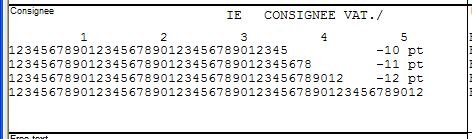
The space available goes from 35 characters per line in a address line through to 52 characters at 15cpi.
This should ensure that there is enough space for even the most complex letter of credit requirements.