These two options, available in all but the
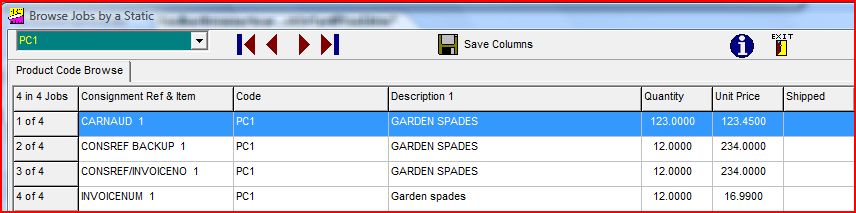
EASI range of systems, allow you to select a product or tariff code, either by typing it in the box or by selection from the drop down list. The system will then display the consignments in which that code has been used. Certain data fields are displayed in columns as in a spreadsheet. The product code
option will display data as per the graphic below:-
It is possible to tailor the presentation of the data by :-
1. Adjusting the size of a column
- by placing the mouse over the line between the headings, holding the left mouse button down and dragging the line to the left to reduce the size of the column
2. Moving the columns into a different order
- by left clicking on a column heading and a vertical line will appear at the left of the column, and then moving the column to the left or right.
If you would like to save this layout for the future please click on the
 button.
button.
Please note that only one setup of columns is available,
so the last saved option is the one which will be displayed the next
time the option is requested.