From a speed point of view, it will undoubtedly help the system to keep the number of "live" jobs in the files to a minimum, but in order to get the best from the reporting options, we would suggest that the minimum time a job should be held in the main database is 13 months.
This will allow you to do a full year's reporting on the live data.
The routine is accessed as below:-
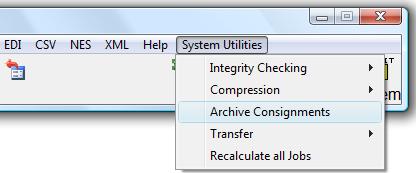
The routine, which is not available in the EASI range of systems, works on the default basis of a range of invoice dates being input and any consignment having invoice date which is in that range will be deleted from the "live" files having been copied into the "Archive". It is possible to change this default by clicking on the drop down against Date, selecting a different key and range of references. At all times you can set additional criteria as shown on the screen below:-

-
click on the first drop down and select the field
-
click on the second drop down and select the operator
-
click on the third drop down and enter the data for matching or not
-
click on the New button

If you use the system to create Quotations and would like to archive some of them, they would be ignored by the above routine as they have no invoice date. However by changing "Print by range" by clicking into consignment, and selecting either :-
1. the range of consignments keyed as the pro-forma/quote number the reference, OR
2. the full range of consignment references and setting a criteria to match the range, OR
3. selecting to match say the Status field as "QUOTE" if you amend the status for this type of job
By the same method but using different criteria it would be possible to archive say sales orders etc.
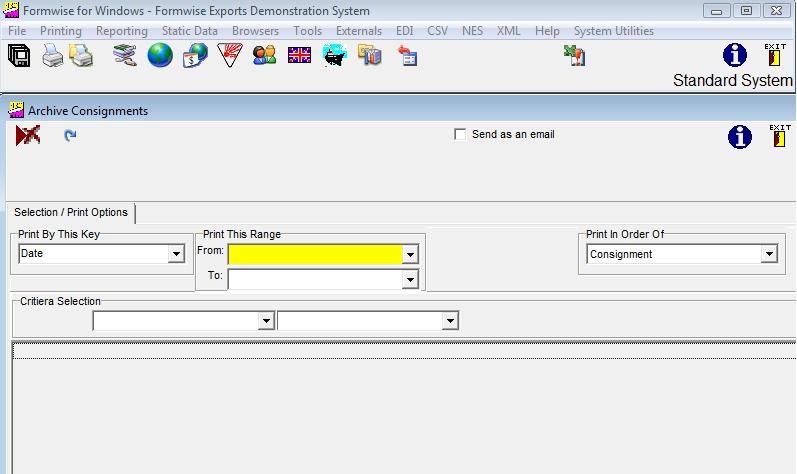
Using the same routine when in the Archive system::
As we have already seen the Formwise system can access both "live" data, and the
"archive" by selecting the appropriate set of files on the File option of the toolbar.
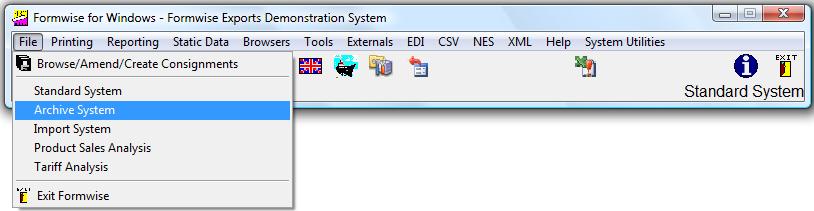
Should you make a mistake and archive some current jobs, it is possible to reverse the process by archiving from the archive files back to the standard data files.